Thursday, March 21, 2013

How To Use Torrents

How To Use Torrents

Introduction

This guide is to help users in getting started in bittorrent, the most popular protocol for the transfer of music, videos, ebooks, software and other content. There is a great deal of content available through torrents and this guide will help you to find and download that content.

What is Bittorrent?

Bittorrent is a decentralized peer to peer (P2P) distribution of content which uses the upload bandwidth of each individual who is downloading the content, and those who have downloaded, to transfer the content. Click on the header above for more information.
  • No central server
  • Content is distributed by active users
  • Transferred content is an exact copy of the original
  • Content associated with a torrent can not be altered
  • Downloads may be stopped and re-started

Best Free Bittorrent Client

To get started in torrents, you first need to have a bittorrent client. Click on the header above for a selection of the best free bittorrent clients.

Optimizing Bittorrent Clients for Speed

After you have chosen a bittorrent client, there are a few steps to set it up properly to be able to communicate to the other active users and to get the best speeds. Click on the header above for guides for all the bittorrent clients that are (and have been) suggested here at Gizmo's Freeware.

Finding Content

There is over 20 million torrents and over 25 PetaBytes of content available through those torrents. Torrent search sites offer the best way to filter results to find the clean and real content that you want. Since the content associated with a torrent can not be altered, comments and ratings may be used to make sure that what you are getting is the quality you want.
Bittorrent is a decentralized protocol, so the content offered is not from the bittorrent clients, but from independent torrent search sites on the web. There are two pages here at Gizmo's Freeware with information on where to find the free content you are looking for.
Searching for Torrents (Best Free Torrent Search Sites)
  • over 20 million torrents in their listings
  • over 25 PetaBytes of content
  • although there is a great deal of legal content at these sites, there is also content at these sites that is copyrighted and not legal to distribute.
Finding Legal (and Free) Torrents
  • over 3 million torrents in their listings
  • all the content offered at these sites is legal to distribute

Additional Help

In addition to the setup guides, above, there are other pages here at Gizmo's Freeware to help with additional features of the bittorrent clients. If there is a feature that you would like help with on a particular client, you may post here or on the help page for that client and I will try to put a guide together

µTorrent & BitTorrent Help - Contains the help articles below and support links

These two clients are identical, so the help pages will work for either.

Vuze Help - Contains the help articles below and support links

qBittorrent Help - Contains the help articles below and support links

Conclusion

Hopefully, this guide has helped in getting you started in bittorrent.
 If you have questions or corrections on any of the features listed here, please post in the comments below or at the Internet, Webware & Networking section of Gizmo's Freeware Forums.

Wednesday, March 20, 2013

6 Free Google Reader Alternatives

As you may have heard, Google Reader will be closing its doors on July 1st, 2013. Those of us who use and depend on RSS feeds are scrambling for alternatives. I've selected six that are web based that have (mostly) apps for iPhone, iPad, and Android.
The first thing you'll want to do is to download all your feeds. You can do this within Google Reader, but Google Takeout makes it much easier and you can get all your Google data at the same time.
Here's a step by step guide to downloading your Google data:
How to Download Your Data with Google Takeout
At the time of this writing bunches of people have signed up for RSS readers. Some of the sites are having a hard time keeping up with the traffic. They may not be reachable due to server overload and all features may change or not be available. I think a few more days should see things settling down quite a bit. If you find one that's down temporarily, give it some time and then check back.
Net Vibes
The granddaddy of them all, Netvibes is a combination start page and RSS reader. It’s highly customizable with a wealth of features from changing the colors and themes to a large selection of items in several categories you can add to your page. You can add pages (shown on the top of the page as tabs) for various interests. News, gardening, politics, travel, technology and more things you may want to add.
If you have a lot of feeds be aware that the amount of feeds should not exceed 150/200 feeds/widgets per private dashboard for optimum use. Directions for importing feeds can be found in the site blog. There are versions for smartphones available on iPad, iPhone and Android. It has a reader view, an offline mode.
Register for free account to use.
NewsBlur
Free account allows up to 12 sites
Supports Web, iPhone, iPad, and Android
This site has seen the most changes over the last 24 hours, from no free accounts, to limited free accounts, changing the amount of feeds with a free account, and increased the price for premium accounts. This site has seen more down time than others. Since this is a single person operation there will be a few ups and downs.
If you are having trouble accessing the main site, give this one a try.
http://dev.newsblur.com/
Free to try, free registration, free and premium accounts
Feedly
Web based, supports iPhone, iPad, and Android with addons for Chrome, Firefox, Safari and Kindle.
Login to feedly using your Google account. Feedly will automatically sync your Google Reader account.
Feedly is building a clone of the Google API called Normandy. It will be in place before Google Reader and all accounts will smoothly transition at that time.
Pulse
"Pulse is a fast and beautiful way to read your favorite blogs, magazines, social networks and newspapers."
Magazine style interface.
Free registration using Facebook or Email
Direct import of RSS feeds from Google Reader
"Bringing the Fun in Reading Back. A beautifully crafted experience that puts content at its heart. Read, save & share your favorite stories."
Bloglines
(Yes, Bloglines. It's been resurrected from the old version)
Google Reader import feature
Free registration uses email address
Web and mobile versions
"Welcome to the all new Bloglines, the best resource for local blogs, news, and events."
The Old Reader
“Just like the old google reader, only better. Import your subscriptions in one click, find your Facebook friends and start sharing.”
Import your feeds directly from your Google Reader account or use our OPML import feature.
Registration requires Facebook or Google account.
No mobile as yet, but sports a mobile friendly interface.

Sunday, March 17, 2013

Wi-Fi for Every Room in the Home

Wi-Fi for Every Room in the Home

The Securifi Almond looks almost like an obese Windows Phone. The Securifi Almond looks almost like an obese Windows Phone.
Wi-Fi is awesome. But when the Wi-Fi signal is weak, it’s almost worse than having no signal at all. You see signal-strength bars, but you can’t connect. Or videos play, but with a lot of pauses. Or your e-mail program tries to download messages, but just hangs there.
I’ve always wondered about Wi-Fi range extenders — little $60 to $80 routerlike boxes that are supposed to grab a weak Wi-Fi signal and amplify it. Recently, I had the perfect chance to put one to the test.
My fiancée’s San Francisco apartment is a chain of rooms off a single hallway. Living room in front, then bedroom, then dining room, then kitchen. Her Wi-Fi base station sits in the living room at the front of the house. That’s where the cable company’s jack enters the apartment.
FDDP
The Times’s technology columnist, David Pogue, keeps you on top of the industry in his free, weekly
Trouble is, in this old, stately building, the walls are thick and strong. By the time the Wi-Fi signal reached her bedroom, it was too flaky to use. Now and then, she could pull up Web sites or check e-mail, but video and music were out of the question. The dining room and kitchen had no Wi-Fi signal at all. That was a disappointment for a skilled chef who likes to listen to Spotify or Pandora as she cooks.
One possibility, of course, was to see about having a second router installed. But that would mean having the cable company install another jack. It seemed as if it would be faster, less expensive and less disruptive to get a Wi-Fi range extender — if those things really worked.
On Amazon, the highest-rated extender at the time I shopped in December was the Securifi Almond. It was billed as the first touch-screen router and range extender, and had strong customer reviews.
It looks great. Some of the range extenders seem to have been designed to be as ugly as possible — they look like, well, networking equipment — but this one looks almost like an obese Windows Phone, thanks to the colorful tiles on its touch screen. It’s very small (4.5 by 4.75 by 1.5 inches).
The touch-screen breakthrough is that you don’t need to connect the Almond to a computer — or to anything but a power outlet — to set it up. We placed it in the hallway outside the bedroom door; it sits nicely and nearly invisibly on the molding above the doorway. On the screen, I tapped the name of the existing Wi-Fi network, entered its password, waited about a minute, and that was it. Suddenly there was a new Wi-Fi network in the back half of the apartment, with the suffix “Almond” on the original network’s name.
This hot spot seems just as fast and capable as the real one, in the living room. My fiancée can now stream music or video, download files, do real work, everywhere in the apartment.
On her laptop, she has to switch manually to the Almond network when she moves into those rooms; my laptop usually hops onto it automatically when it wakes up.
The fine print: The Almond is also a regular router; that is, you can plug your cable modem into it to create a Wi-Fi hot spot. We didn’t use it in that configuration. If you do, note that its Ethernet jacks are not gigabit speed.
You should also know that rival range extenders are dual-band (they offer both 2.4 and 5 gigahertz bands, if you know what that means), whereas the Almond is 2.4 only. Rival extenders can cost less and offer more networking features.
But they’re also uglier and far more complicated to set up. The Almond does beautifully as a simple, effortless, attractive way for non-nerds to extend their hot spots into un-blanketed corners of the house.

Tuesday, February 26, 2013

Net providers begin warning of illegal downloads

Net providers begin warning of illegal downloads

Computer keys
Getty Images
Internet users who illegally share music, movies or television shows online could soon receive warning notices from the nation's five major Internet service providers.
The Copyright Alert System, organized by the recording and film industry, is being activated this week to target consumers using peer-to-peer software.
Under the new system, complaints will prompt an Internet service provider — such as Verizon or AT&T — to notify a customer whose Internet address has been detected sharing files illegally. A person will be given up to six opportunities to stop before the Internet provider will take more drastic steps, such as temporarily slowing their connection, or redirecting Internet traffic until they acknowledge they received a notice or review educational materials about copyright law.
Consumers who maintain they have been wrongly accused would be forced to pay $35 to appeal the decision. The fee would be reimbursed if they prevail.
Proponents say the focus is on deterring the average consumer rather than chronic violators. The director of the organization behind the system, Jill Lesser of the Center for Copyright Infringement, said in a blog post Monday that the program is "meant to educate rather than punish, and direct (users) to legal alternatives."
Each Internet provider is expected to implement their own system. The other providers expected to participate are Cablevision, Time Warner Cable and Comcast. (NBC News is part of NBCUniversal, which is owned by Comcast, a provider of cable TV and broadband Internet access.)
The program gives each customer five or six "strikes" after a music or film company has detected illegal file-sharing and lodged a complaint. The first alerts are expected to be educational, while the third and fourth would require the customer to acknowledge that they have received the warnings and understand their behavior is illegal. The final warnings are expected to lead to "mitigation measures," such as slowing a person's Internet connection speeds.
Officials involved in the effort acknowledge it's unlikely to stop the biggest violators. There are ways to disguise an IP address or use a neighbor's connection that is unlocked. Public wireless connections, such as those offered at coffee shops, also won't be monitored.

Tuesday, February 5, 2013

How to Generate Credit Card Numbers

How to Generate Credit Card Numbers


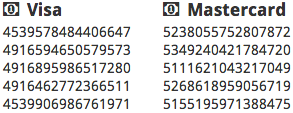
First of all, I don’t want anyone to get the wrong idea; although the credit card numbers you generate are valid, they’re not active and aren’t for making (fraudulent) purchases.
So, what’s the point?
red amex
Just like you may use a junk email address to sign up for special offers, you may want a junk credit card number too. That’s because free things are rarely ever free and that’s especially true of free trials.
Companies frequently offer “free” trials in exchange for your billing info. They’re betting against you — hoping you’ll forget to cancel your subscription so they can get some money out of you for at least one month, maybe a couple months if it’s only a few bucks and you’re too busy to cancel at the moment you notice the charge. Then you’ll probably forget about it until you see it again next month.
There are lots of great websites out there that require subscriptions and I think you should pay for and support the ones you use and enjoy. But, before you know if it’s a newspaper you enjoy, you may want to test drive their free trial and a generated credit card number can help you cut the strings and keep you safe from fake sites looking to capture your personal info.
credit card numbers
I know what you’re thinking, “How can I generate a credit card number, isn’t that something only the credit card company can do?”
Credit card numbers are generated based on a formula. A valid number is simply a number that conforms to a validation algorithm; they use check digits like we saw with UPC Barcodes.
An active number is a card number that conforms to this algorithm and is currently issued to a customer. While it’s technically possible that you could generate a number that is currently issued to a customer, it’s very unlikely since there are trillions of possible numbers. The odds are far greater that you’d win the lottery and of course those odds are very slim to begin with. Also, you don’t have the correct billing info for the customer, so a charge would never be approved anyway.
For free trials, you don’t need an active number since it never needs to be charged during the free trial period. You just need a number that is valid according to the algorithm so you can create a trial account at the new website you want to try.
You won’t be able to use these numbers for purchases because you’re missing critical information such as the: expiration date, CVV number, billing name, address and phone number. If a site is asking for this info for your generated card, you can make it up. The site won’t know it’s invalid unless they attempt to charge the card, and then a generated number is of no use to you anyway.
If you google around, you can find lists of “test credit card numbers” but chances are really good that these numbers have been used on most popular sites and they’re not going to work for you. To generate your own number, my favorite site is: http://www.getcreditcardnumbers.com/

Friday, December 21, 2012

Manual for mipony download manager


2º Paste the text with the links to "add links" and click on "paste and detect link". This step is not necessary if you have activated the option "capture". You can also paste the web address that contains the files to download, such as http://www.megaupload.com/?d=E9XF7MHA

Once this step is finished, the program detects the links and checks that the servers are available, if they are, they will have the check in green and will be marked automatically for download. If you do not want to download them, you just have to unmark them.

QUICK GUIDE
Mipony is simple and at the same time, it offers you many options. For your first steps with the program you can follow these instructions.
1º Once you have found the files to download, copy the text that contains the links (you can also copy the web address where the files are).


3º Then, click on "download selected".

Then, you just have to click on "Detect links", and the program searches for the link of files and it shows them on the screen. Then, you just have to select the ones you want to download and click on "Download selected”.

OPTIONS
From the Options screen you have the possibility to adjust the program to your needs.


-"Limit the download speed to": You can set the maximum speed at which downloads can be done by Mipony.
-"Simultaneous downloads": Establish how many simultaneous downloads can be made by different servers at once.
-"Simultaneous downloads by website": Establish how many simultaneous downloads can be made from each server, the rest would remain in queue. However, if you don’t have a premium account, the majority of servers limit the number of simultaneous downloads so that the maximum number put here cannot be reached.
-"Clear completed files when exiting": Removes the completed files from the list of downloads upon closing the program. If this is not not activated, when you open the program again the file will be in the list. In the case of the files that have a password logged, even though this option is checked, they will not be removed automatically.
-"Number of retries per download": if the download fails, the program will try again as many times as you indicate.
-Add "Download in MiPony" to the Internet Explorer menu: this function is only for the Windows browser, Internet Explorer. If this option is activated, the “Download in Mipony” option will appear in the context menu (right click) in the browser. When you click it, it will automatically be copied and pasted in Mipony and begin to download.
-"Priority": By default, the files are downloaded according to the order in which they were added to the downloads list, but if you want to change the order there are two methods:
Download the files following the order of the downloads list. With this option chosen the files will be downloaded according to the order of the downloads list. To change a file’s position you can drag it or right click in the “Priority” menu, to raise or lower the position.
Use priotities in files to establish the order of the download. With this option the download list can be arranged by clicking on the column, but this does not change the order of the download, which will be according to how the links were added. To change the order in this option right-click on the menu and “Priority”, to give greater or lesser priority to the file download.


In this way, they are added to the download list and can be viewed in the screen "Download
Once the files have been downloaded, if they have to be joined, you can activate “join files” and a window will be opened where you have to select them, choose the location where you want to save the result and click on "Start".

BROWSER
Through the screen "Navigate and download" you can navigate easily over the Internet or paste the address of the website from where you want to download the files.

s".

2º Paste the text with the links to "add links" and click on "paste and detect link". This step is not necessary if you have activated the option "capture". You can also paste the web address that contains the files to download, such as http://www.megaupload.com/?d=E9XF7MHA

Once this step is finished, the program detects the links and checks that the servers are available, if they are, they will have the check in green and will be marked automatically for download. If you do not want to download them, you just have to unmark them.
3º Then, click on "download selected".

In this way, they are added to the download list and can be viewed in the screen "Downloads".


Once the files have been downloaded, if they have to be joined, you can activate “join files” and a window will be opened where you have to select them, choose the location where you want to save the result and click on "Start".


BROWSER
Through the screen "Navigate and download" you can navigate easily over the Internet or paste the address of the website from where you want to download the files.

Then, you just have to click on "Detect links", and the program searches for the link of files and it shows them on the screen. Then, you just have to select the ones you want to download and click on "Download selected”.


OPTIONS
From the Options screen you have the possibility to adjust the program to your needs.

-"Limit the download speed to": You can set the maximum speed at which downloads can be done by Mipony.
-"Simultaneous downloads": Establish how many simultaneous downloads can be made by different servers at once.
-"Simultaneous downloads by website": Establish how many simultaneous downloads can be made from each server, the rest would remain in queue. However, if you don’t have a premium account, the majority of servers limit the number of simultaneous downloads so that the maximum number put here cannot be reached.
-"Clear completed files when exiting": Removes the completed files from the list of downloads upon closing the program. If this is not not activated, when you open the program again the file will be in the list. In the case of the files that have a password logged, even though this option is checked, they will not be removed automatically.
-"Number of retries per download": if the download fails, the program will try again as many times as you indicate.
-Add "Download in MiPony" to the Internet Explorer menu: this function is only for the Windows browser, Internet Explorer. If this option is activated, the “Download in Mipony” option will appear in the context menu (right click) in the browser. When you click it, it will automatically be copied and pasted in Mipony and begin to download.
-"Priority": By default, the files are downloaded according to the order in which they were added to the downloads list, but if you want to change the order there are two methods:
Download the files following the order of the downloads list. With this option chosen the files will be downloaded according to the order of the downloads list. To change a file’s position you can drag it or right click in the “Priority” menu, to raise or lower the position.
Use priotities in files to establish the order of the download. With this option the download list can be arranged by clicking on the column, but this does not change the order of the download, which will be according to how the links were added. To change the order in this option right-click on the menu and “Priority”, to give greater or lesser priority to the file download.


-Advanced: once the "Automatically extract RAR files after downloading them” option is activated, you can specify what folder they will be stored in once extracted. Extracting rar files after they are downloaded sometimes requires a password. Mipony develops a list of passwords to extract files, that grows automatically with passwords that were used successfully.
If none of the stored passwords work, Mipony will request one. Before requesting a password from the user, Mipony tests all the passwords on the list, so that if you download many files that have the same password, Mipony will only request it the first time.
-Premium: to achieve maximum speeds and avoid delays you can create a premium account from here, and if you already have an account fill in your information in order to take advantage of the program. This is not only valid for premium accounts, if you have a free account you can also imput your information here and Mipony will use it to improve downloads, even though it will never be as fast as if you had a premium account.
The smart solution to avoiding delays is to have a premium account.
-Advanced: once the "Automatically extract RAR files after downloading them” option is activated, you can specify what folder they will be stored in once extracted. Extracting rar files after they are downloaded sometimes requires a password. Mipony develops a list of passwords to extract files, that grows automatically with passwords that were used successfully.
If none of the stored passwords work, Mipony will request one. Before requesting a password from the user, Mipony tests all the passwords on the list, so that if you download many files that have the same password, Mipony will only request it the first time.

-Premium: to achieve maximum speeds and avoid delays you can create a premium account from here, and if you already have an account fill in your information in order to take advantage of the program. This is not only valid for premium accounts, if you have a free account you can also imput your information here and Mipony will use it to improve downloads, even though it will never be as fast as if you had a premium account.
The smart solution to avoiding delays is to have a premium account.